

This will be the first post in a short series that considers a very useful interaction – accessing Laboratory data such as blood tests from a repository of data via (of course) a FHIR API. The actual repository we use doesn’t really matter – it could be a part of an EHR, or an interface that the lab exposes or it could be a standalone data repository such as a regional or National store – it’s the API that counts.
There are a number of different perspectives that we can take, of which two are:
- Accessing data about a particular person – whether by the person themselves or an authorized clinician.
- Accessing data from the perspective of the ordering clinician – e.g. all the tests they have ordered, but not yet reviewed. This would return the results belonging to multiple people.
In this post we’ll take a look at the first perspective – accessing a single person’s data. We’ll consider the clinicians perspective in a subsequent post.
The kind of use cases that we’ll want to fulfill include:
- Find all the lab tests for a given person (could be a Clinician looking up data for a patient, or a consumer looking up their own data). We’d want to be able to select a date range (at least) as the quantity could be quite large.
- Find all the lab tests of a given type for that person – e.g. get all the glucose results over a given period. This can get somewhat complicated – we’ll explore the reasons why in the next post.
- Find any abnormal results in the last x months
And there are plenty of others…
Let’s start by thinking about the resources we’ll need to represent this data – remembering that this is the way that the data will be structured as it is shared – it won’t necessarily be how it is stored – in fact it’s very likely that there will need to be an interface layer in front of the repository that understands and produces FHIR, and which maps to data in the repository.
There are 2 core resources, and a number of supporting ones.
The DiagnosticReport resource represents a report that has been issued by the lab and stored in the repository. It has information about the process that led to the report (who did it, when it was done, the specimens used and so forth). It also has a reference to the Order that lead to the test/s being performed.
A DiagnosticReport may be about a single test result (eg a glucose or a warfarin level) or it may be about a number of different results such as a Complete Blood Count that has within it a haemoglobin, White Cell Count, Differential and others. This is often called a ‘panel’.
While the DiagnosticReport can contain a human rendering of the report (eg as a PDF document), generally the actual results are contained within separate resources – the Observation resource that the DiagnosticReport has one or more references to.
If the report is about a single result (eg the glucose example), then there will be a reference to a single Observation that has that result (and a .code value within it that identifies it as a glucose result).
If this is a panel of results (the CBC example), then there could either be one Observation per result or a single Observation that has all the results within the Observation.component. In general terms it is better to have a separate Observation per result, as this will make subsequent querying much easier. (A good example of where using components is reasonable is the Glascow Coma Scale, where there is a single score, but there are multiple observations that made up the score – and there isn’t really a need to look at the individual observation outside the scope of the score).
The following graph (from clinFHIR GraphBuilder) shows a fairly complete example of a CBC with a single DiagnosticReport and 3 referenced Observations – the Haemoglobin, White cell count and platelet count.
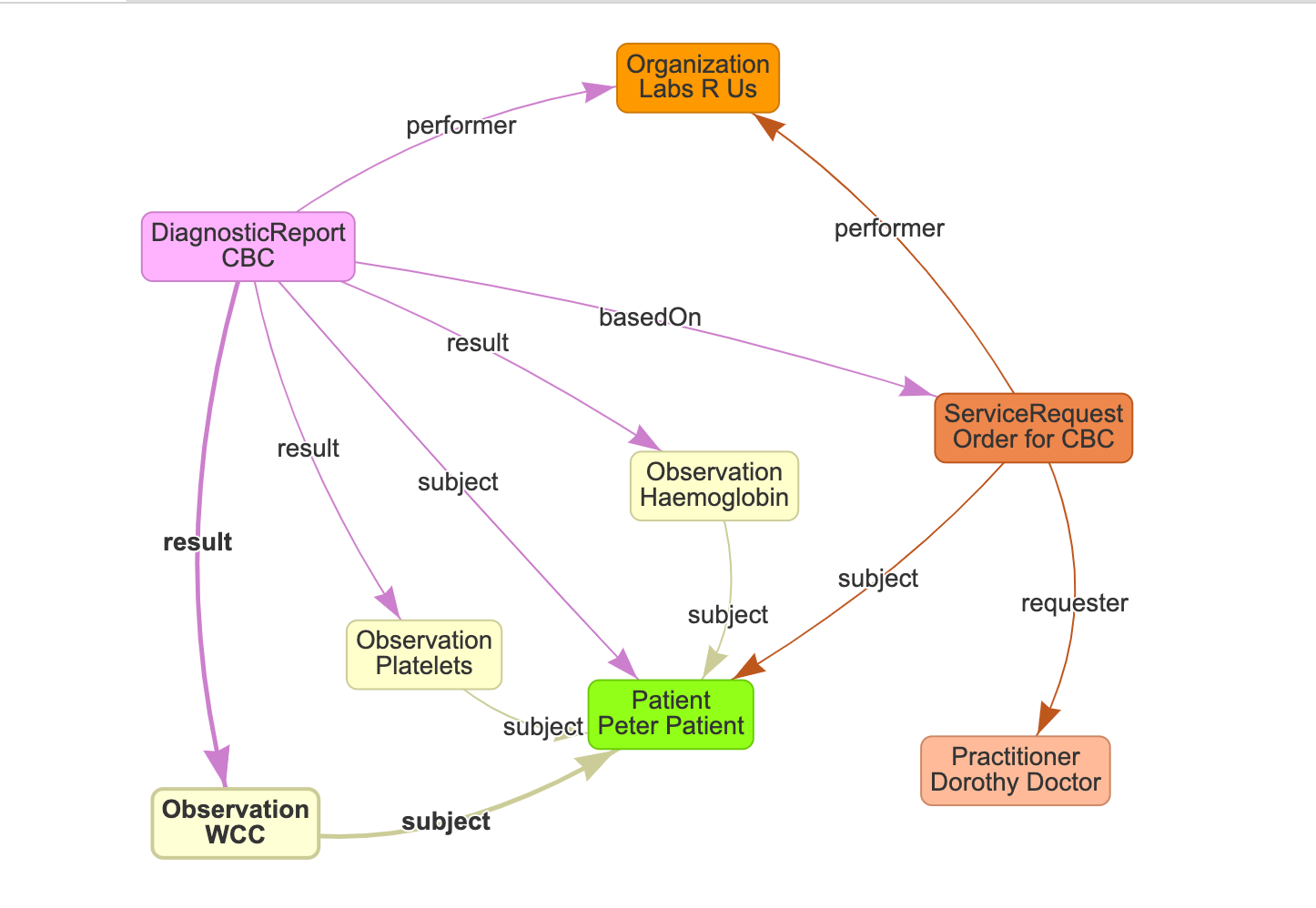
This graph also contains a number of the supporting resources.
- The Patient is person who the tests are about. Note that most of the other resources – DiagnosticReport, Observations and ServiceRequest have a reference to the Patient that they are about.
- The ServiceRequest represents the order that was made by the Clinician (represented by the Practitioner resource). It has a reference to the ordering Clinician, as well as other information about the request (such as the date the request was made, the priority, supporting information and so forth).
- The Lab is represented by an Organization and is referenced by both ServiceRequest and DiagnosticReport
- There is a reference from the DiagnosticReport to the ServiceRequest (the .basedOn element) which provides the link from the report back to the ordering details.
Note that this is just a sample graph – there is a lot more information that could be included – for example both DiagnosticReport and ServiceRequest have a possible link to an Encounter. You’d use profiling if you wanted to make some of these decisions explicit.
With this graph in mind, let’s think about the API we’re going to need to access this data.
First up, each query will need to indicate the patient in some way. There are a number of ways we could to this, but we’re going to use a patient identifier. This could be the internal Medical Record Number of the patient, or some other identifier. Which one we choose will depend on what the repository holds. In New Zealand, we’re fortunate to have a national patient identifier, and most (if not all) systems will have that number, so it’s a good choice for us.
(In the event that the identifier query wasn’t supported, then we’d need to query the repository on Patient to find the id of the patient, then use that id in the subsequent queries. Not all that elegant.)
Let’s think about the ‘get all results’ query. We could either query for DiagnosticReport resources – and get the Observations from that, or query the Observation resources directly. The latter approach is going to be best if we’re looking for a particular result type (eg glucose) – we’ll talk more about that in the next post. But it will not have references to order information such as the ordering clinician, or any other order related data, and in many cases clinicians in particular are used to the ‘grouping’ that the DiagnosticReport provides.
So let’s query on DiagnosticReport.
Here’s a simple query that will return all the DiagnosticReports for a given patient based on their identifier (using a chained query)
[host]/DiagnosticReport?subject.identifier={patient identifier}This will return the DiagnosticReport resources, but not the actual Observations. We could get those separately by querying for each Observation based on the references in the DiagnosticReport, but let’s get the server to do the work by using an include parameter on the query like so:
[host]/DiagnosticReport?subject.identifier={patient identifier}&_include= DiagnosticReport:resultThis will cause the server to return all matching DiagnosticReport resources and their referenced Observations. (Assuming that the server supports these features – otherwise we’re back to the client intensive way of getting them one at a time – until we can convince the repository vendor to play nicely with their clients!)
And a reminder that the _include parameter uses the search parameter name NOT the element name (though they are often the same, as in this example.
And if we wanted to limit the amount of results we get back – eg by specifying a date range, then we can use any of the supported search parameters on DiagnosticReport. For example, assume I only wanted results for this patient from this year:
[host]/DiagnosticReport?subject.identifier={patient identifier}&_include= DiagnosticReport:result&date=2021Unfortunately, life gets a little trickier if we want to include more ‘order-related’ details about the result – such as the ordering clinician. The Practitioner representing them is a couple of resources removed from the DiagnosticReport:
DiagnosticReport -> ServiceRequest -> Practitioner
The REST API does allow this depth of inclusion (using the :iterate modifier) but it’s a reasonably complex query, and one that not all servers are likely to support. What might be feasible is to include the ServiceRequest in the list of included resources, and then separately get the clinician from the ServiceRequest.requester element. And – with a bit of luck – the server will include the display element in the reference so that there’s something to show the user without needing to retrieve the Practitioner resource. Indeed, this is the whole point of the display element on reference.
So that’s enough for this post.
Next up we’ll focus on coding, and think about some of the issues we face when we want more targeted queries.