Updates to clinFHIR
July 13, 2026 3 Comments
I’ve just published an update to clinFHIR – well, not so much an update as a re-packaging of the underlying codebase into docker containers, and rationalizing the number of servers I’m using.
As part of the update I’ve replaced the front page (with a little help from AI) and only included the apps that I believe people are actually using (and actually still work!). Let me know if there’s any I’ve missed)
The previous version of clinFHIR is still available here, and Graph builder is here. I’ll leave them up for a month or so in case of any issues, but then they will be removed – likely around the end of August 2026.
If you do have any issues/questions/concerns then raise them on the zulip chat.
Here is the new front page

To load a module, click on the card in the right pane. The Question Mark icon (?) in the lower right of each card will load some documentation (which is also accessible from each module itself).
Most of the modules work against the R4/R4B versions of FHIR. Support for R5/R6 is in progress.
Here is a brief description of the modules that are included in this release.
The Patient Viewer is aimed at the Clinician or Analyst and shows how resource instances are ‘joined together’ by references to form a ‘graph’ of resources that represent the use case you want to represent. The main change is improvements to the way a graph can be selected, with options to select from a set of sample graphs. There’s also been a general tidy up of the UI.
Here’s the ‘child with a sore ear’ graph

Bundle Viewer (renamed from Bundle Visualizer) displays the contents of a FHIR bundle in a number of different formats. Similar to the Patient Viewer in some ways, it’s more aimed at the technical user allowing you to view and validate the resources within the bundle. Like the Patient Viewer, most of the changes are in how Bundles can be selected for viewing with options to store a bundle directly in the browser /Library, or link to a bundle (which can be a query on a FHIR server or any other link that returns a Bundle in Json format).
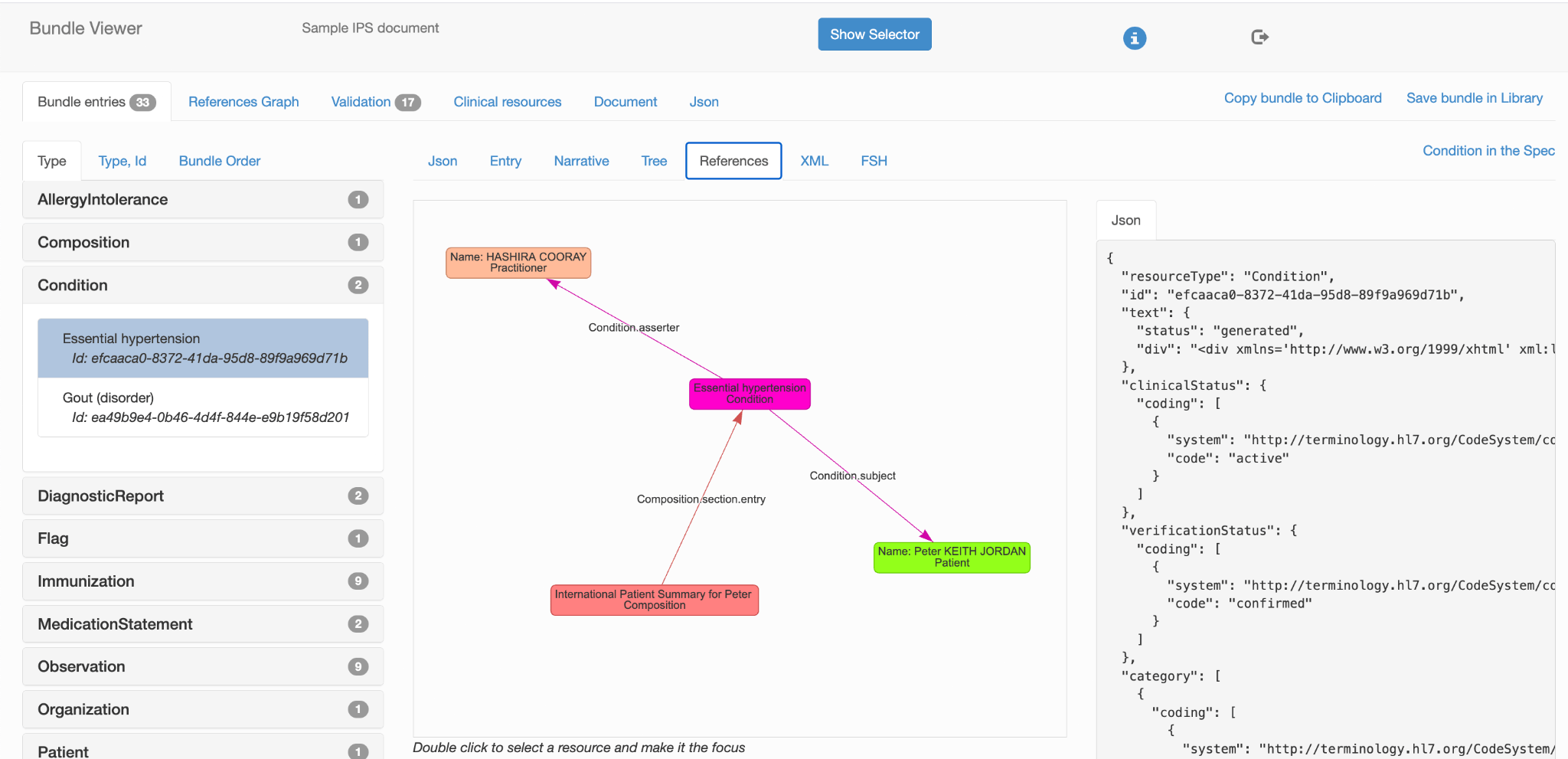
GraphBuilder is an authoring tool rather than a viewer.
Organized into individual projects, you select resource types and add them to the graph as resource instances, and wire up the references between them. The application ‘understands’ FHIR and will only allow valid references and resources to be added.
It has 2 main purposes:
- As an educational resource to help solidify the concept that the resource graph is the key to understanding FHIR (In my opinion anyway 🙂 )
- As a design tool when deciding which resources are the most useful to represent a given use case, and how they should be connected.
The module uses FHIR Shorthand (FSH) as the ‘source of truth’ which is subsequently converted into FHIR instances as needed. This means that you can directly author the instances in FSH if you are familiar with that language. The resource instance can be validated.
Note that if you have developed a graph using the previous version, then it will not appear in the list of graphs and will not be the library (which I haven’t migrated). If that’s an issue for you, let me know in the Zulip chat.

Server Query is rather like a POSTMan style REST query tool, but designed for FHIR. You can either use the query builder (shown below) or enter a REST query directly, and the results will be shown in a FHIR friendly way including Json. XML and FSH, along with a graph view (where the query returns a graph of resources – like the $everything operation) and a simple validator.

The remaining 3 modules are all new, and are derived from work that I’ve been doing with the CanShare project over the past few years.
Questionnaire Viewer will display the contents of any valid Questionnaire resource in a couple of formats.
- As a hierarchical tree, with the ability to display the contents of an item including all the ancestor items so you can determine what is in context at any item – particularly useful for SDC Questionnaires
- A rendered form – courtesy of the excellent Fhirpath Lab from Brian Postlethwaite and the CSIRO renderer. The two are integrated using the SMART web messaging standard so that the user can:
- Invoke SDC pre-population using pre-defined test resources. Fhirpath lab supplies the underlying operation
- Complete the form exactly as a user would
- View the QuestionnaireResponse data in real-time as the form is updated
- Invoke the SDC extraction mechanism, and view the resultant Bundle as a graph. Again, the operation is provided by Fhirpath lab.
There are various options to select a form from existing Questionnaires, or just paste an ad-hoc Questionnaire resource (json) into the module.
One ‘gotcha’ worth mentioning is that sometimes the form doesn’t render initially in the tab. If this happens click the ‘Refresh’ link above the iFrame to re-load it.
Note that Fhirpath lab has a host of other features for the form builder – and FHIRPath user – so well worth a look.

QuestionnaireResponse Viewer, as its name suggests, takes a QR resource and renders it as a table. The associated Questionnaire needs to be available – by default it’s in the Fhirpath lab, but you can enter the url to another server if needed.

The Questionnaire Editor is designed to generate Questionnaires, based on a user defined internal model. It supports component based re-use of ‘dataGroups’ and is designed to support SDC based design – particularly definition based resource extraction. The Questionnaire Viewer was developed as its complement – design in the editor, review/test in the Viewer.

 About David Hay


Great to see clinFHIR continuing to evolve. Repackaging the platform into Docker containers and simplifying the available modules should make it easier to maintain while providing a cleaner experience for users
Kudos, David. Nice work.
Thanks Jay!